



Install your favorite Linux distro on a USB stick
If you're willing to start immersing yourself in the Linux environment, but you still don't want to install this operating system on the hard drive together with your current Windows operating system, Universal USB installer is an application that will make it a lot easier for you to take your first steps in the open-source systems. Thanks to this tool you can start your favorite Linux from your USB key.
How to install Linux on a USB stick
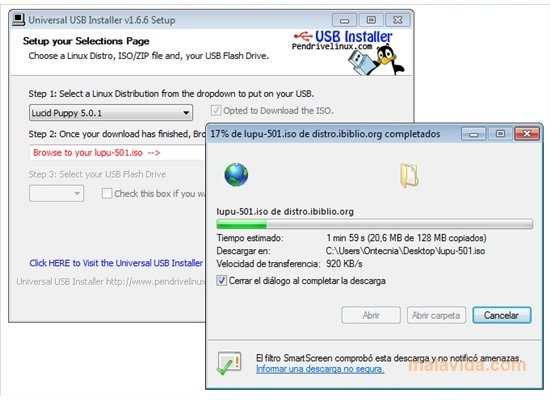
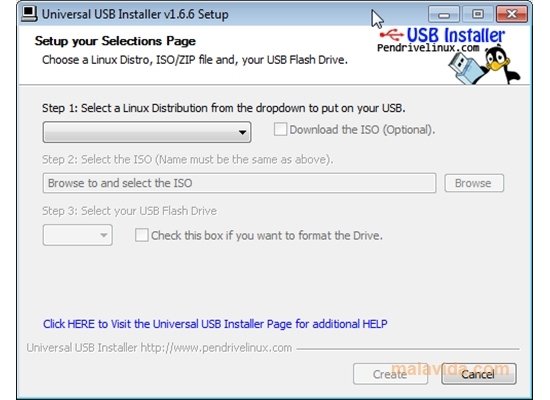
With Universal USB Installer it is very easy to install any Linux distro on your pendrive because you only have to follow the steps that are indicated on the interface:
- Step 1. Select from the vast amount of distributions that the application offers you to install it on your pendrive.
- Step 2. Find the corresponding ISO or ZIP file on your hard drive. If you can't find it, Universal USB Installer will offer you the possibility to download the ISO of the distribution you have chosen to save it on your hard drive and use it with the application.
- Step 3. Finally, connect your pendrive to the USB port and select the corresponding option.
Once you have performed these steps, it will start the installation of the distro you have chosen. Take into account that it's advisable to format the USB device to obtain a clean installation, but that if you do so you will lose all the information that it contains.
 Vanessa Martín
¡Hi! I am Vanessa Martin, I like to travel, music, photography, and I am passionate about the Internet, as it is a great source of information where you can find everything you need. If it exists, it is on the Internet. Another of my great...

Antony Peel